 Storage Unit Tracker
Storage unit inventory, mapped
Know exactly where everything is in your storage unit
A list tells you what you own. Storage Unit Tracker draws your unit at its real size, lets you map the shelves, stacks and piles with your finger, and then tells you the precise spot to walk to. No more opening eight boxes to find the winter coats.
Free to start. No account and no ads.
- iPhone, iPad & Android
- Works offline
- Free CSV export
- Your photos stay yours
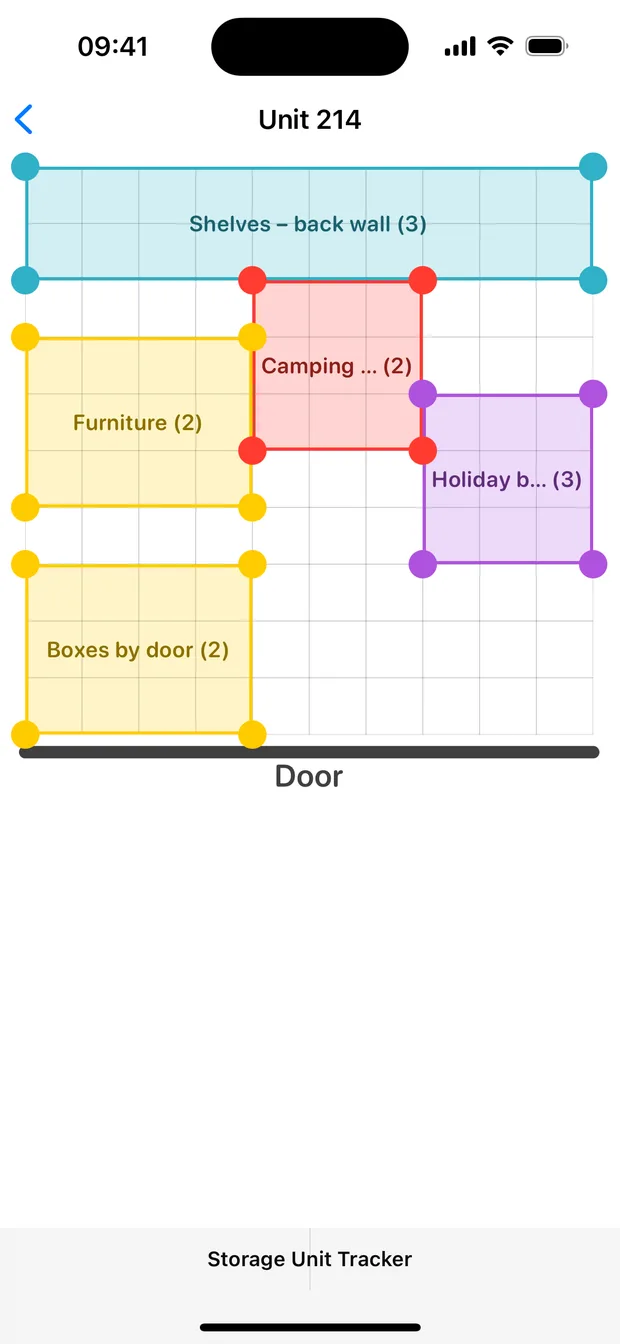
Why a map beats a list
A list tells you what you stored. A map tells you where it is.
You are standing at the roll-up door with a flashlight and twenty minutes. A spreadsheet of 300 items does not help you. A picture of your unit with "Holiday boxes, back-right corner" does.
A plain list or spreadsheet
- Rows to scroll, in an order that has nothing to do with the room
- Locations typed as guesses: "somewhere in the back"
- Nothing tells you which corner to walk to
- Sizes and layout live in your head, not in the file
- Photos, if any, sit apart from the location
Storage Unit Tracker
- A scaled floor plan of your actual unit, drawn with your finger
- Areas you name the way you talk: "shelves in back", "boxes by the door"
- Search an item and the app hands you the exact area
- Photos attached to the spot they belong to
- CSV export of the whole inventory, whenever you want it
How it works
Four steps to a unit you can actually search
No setup wizard, no barcode scanner, no labels to print. Just your phone and the unit in front of you.
-
Create the unit at its real size
Tap a common size such as 5×5, 5×10 or 10×10, or type any custom footprint. The grid steps in feet, so what you draw matches what you rent.
-
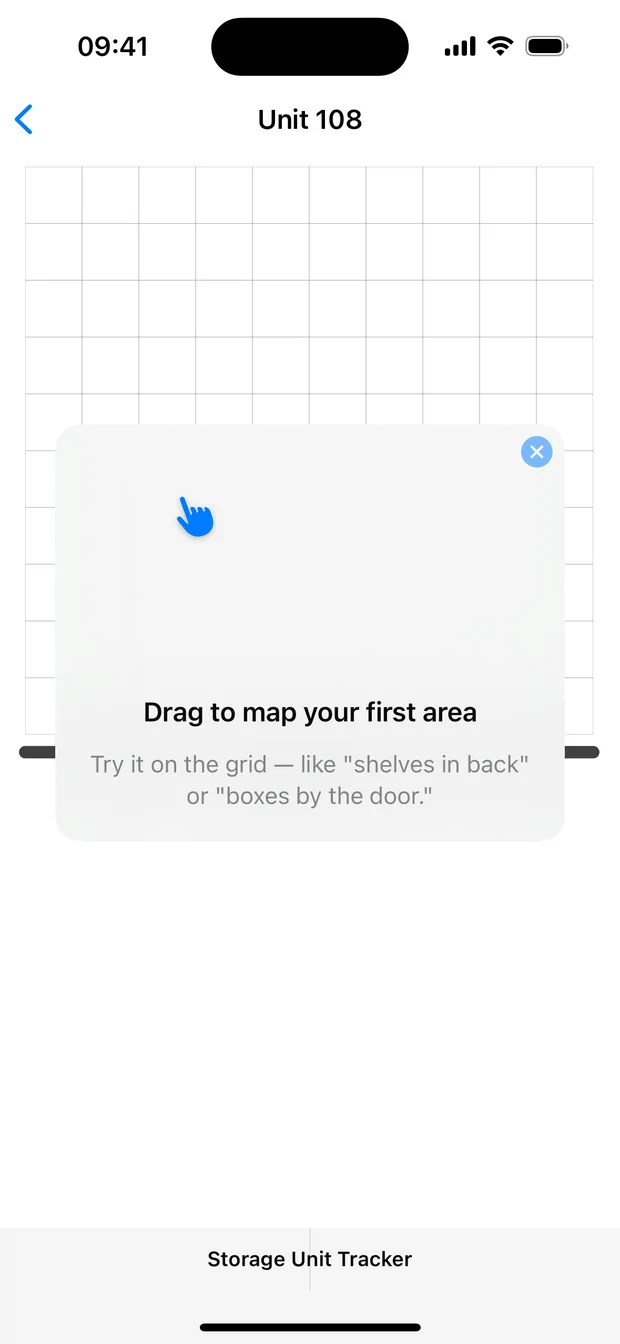
Drag to map the areas
Draw a rectangle where the shelves are. Another for the stack by the door. Move and resize them with corner handles until the map looks like the room.
-
Fill areas with items and photos
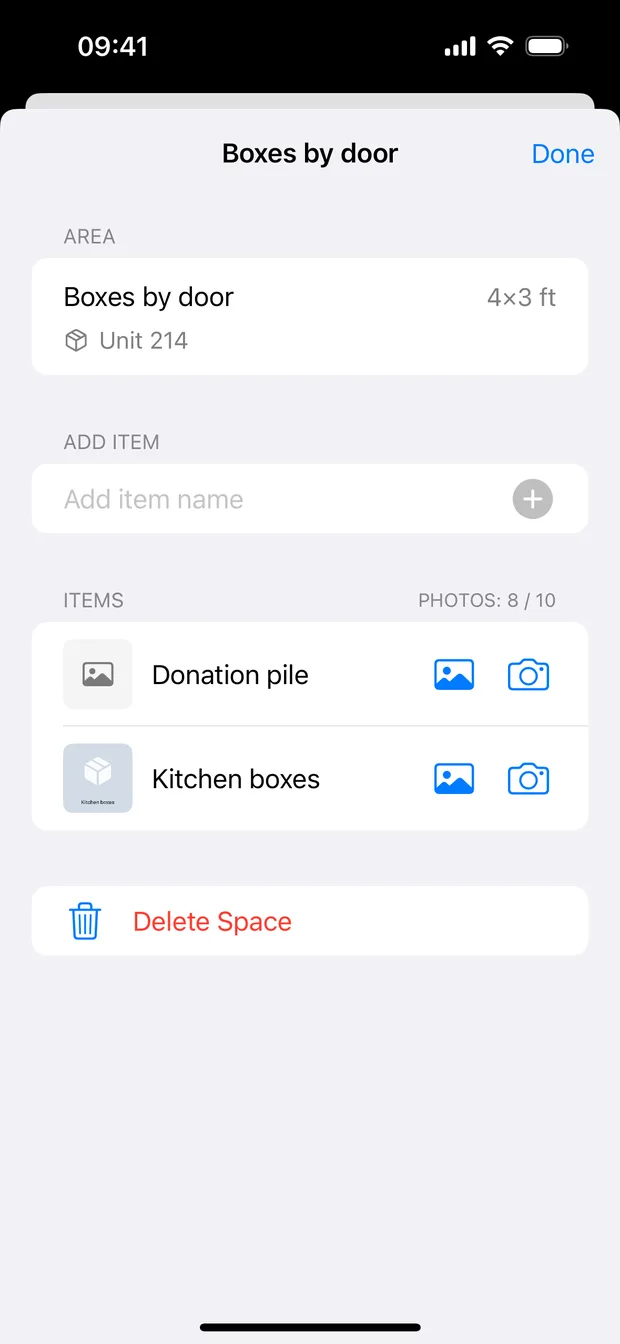
Add items to each area and snap a photo from the camera or pull one from your library. Now you can see inside a box without opening it.
-
Search instead of digging
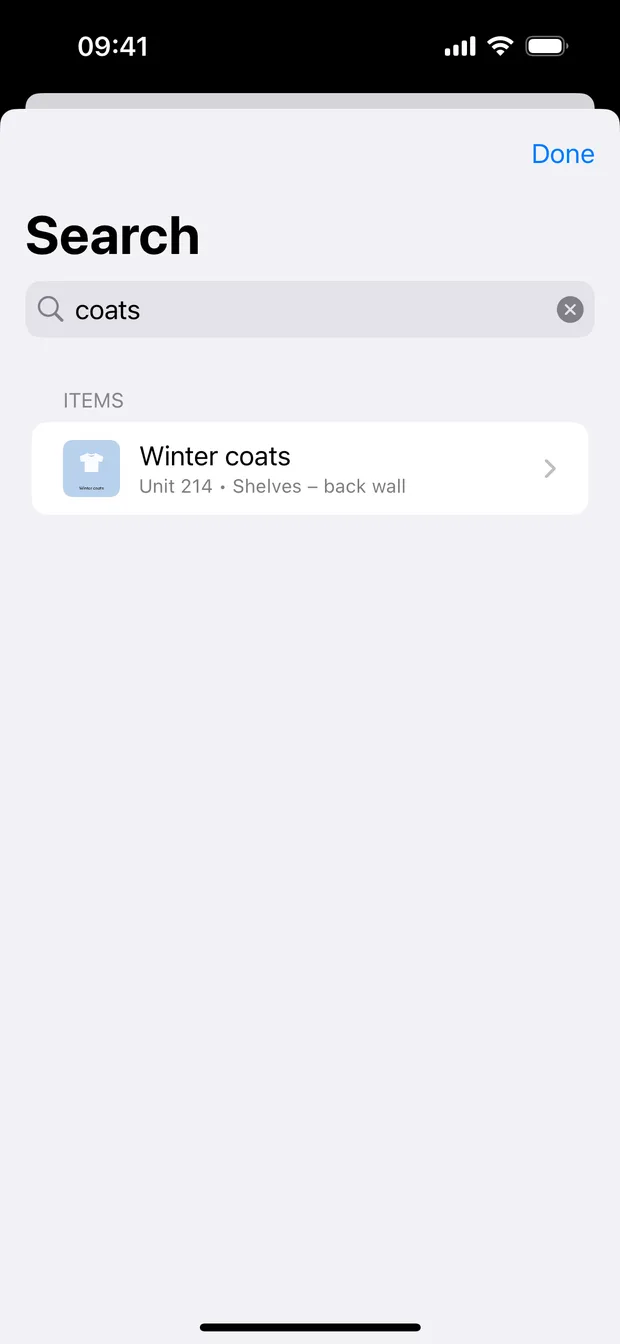
Type "coats" and the app shows the item, its photo, and the exact unit and area it lives in. Then walk straight to it.
See it
The whole app, in five screens
Real screens from the iPhone version. The Android app has the same features.
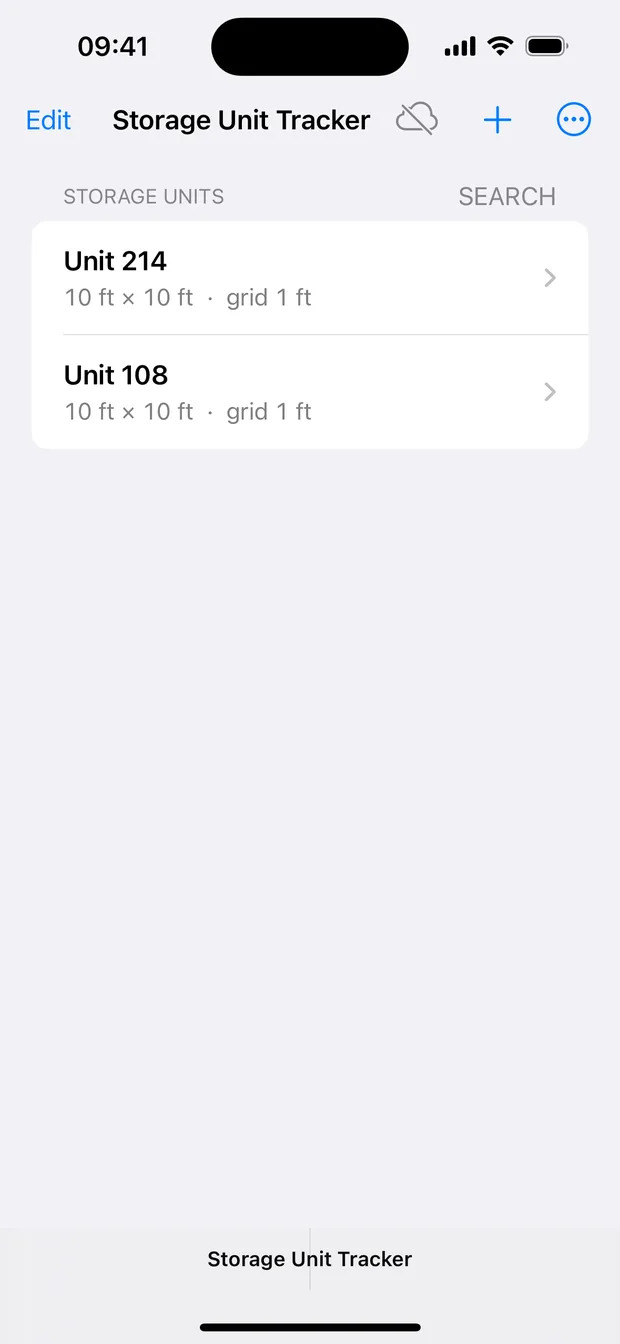
Features
Small app, no busywork, everything you need
Built to be usable in a dusty hallway with one hand and no signal.
True-to-size floor plans
One-tap presets for common unit sizes plus any custom footprint, with a grid measured in feet so an area drawn 4×3 really is 4 by 3.
Draw, move, resize
Drag on the grid to create an area, drag the area to move it, grab a corner handle to resize. Tap an area to open what is inside.
Areas named your way
"Shelves in back", "boxes by the door", "Grandma's furniture". Rename any area or unit at any time.
Unlimited areas and items
No cap on how many areas you draw or how many items you record, on any tier, including free.
Photos of what is inside
Shoot straight from the camera or pick from your library. Images are downscaled on the way in, so hundreds of photos stay light on storage.
Zoom into any photo
Tap a thumbnail for a full-screen lightbox with pinch zoom and pan, to read a label without driving over.
Search that answers "where"
One search covers units, areas and items, shows a thumbnail, and names the unit and area holding it.
Fully offline
Everything lives on your device. Concrete walls and zero bars do not slow the app down at all.
Private iCloud sync on Apple devices
iPhone and iPad mirror through your own private iCloud, so the map you drew at the unit is on the iPad at home. No Vertolini account involved.
Free CSV export
Send your whole inventory, units, areas, items and dates, to a spreadsheet whenever you want. It is part of the free version.
A record with dates and photos
Every item carries the date you added it, its photo and its location, and the whole set exports to CSV if you ever need to hand it to someone.
No ads and no account
Nothing to sign up for and no advertising. An upgrade is offered when you reach the free unit or photo limit, and everything you already mapped keeps working.
Who it is for
Anything with a footprint and too much stuff in it
- Self storage units and lockersThe core case. Map the unit once, then stop paying for a room you are afraid to open.
- Moving and downsizingTrack what went into storage during the move, and find it again on the other side.
- Garages, basements and atticsThe same grid works for a two-car garage or a crawlspace.
- Seasonal gearHoliday decorations, camping equipment, winter clothes, patio furniture. Search instead of guessing.
- Insurance and estate recordsPhotographed, dated, located inventory you can export to CSV for an adjuster or a family member.
- Small business and tool storageStock, props, event gear or job-site tools spread across several spaces.
- Shared family storageMap who put what where, so the answer is not a group text at 9pm.
- Anyone who hates diggingIf you have ever unstacked six boxes for a single item, this is the whole point.
The free version
Map a whole unit without paying anything
The free version is not a demo. It maps one complete storage unit, with as many areas and items as you care to add, and every feature on this page.
What free covers
- 1 storage unit, mapped in full
- 15 photos across your inventory
- Unlimited areas and items, always
- Search, photo zoom and offline use
- CSV export of everything
- No account and no ads
If you need more room
- Optional in-app upgrades raise the limit to 5 or 10 units
- They raise the photo limit too
- Areas and items stay unlimited either way
- Everything you already mapped keeps working
The App Store and Google Play show what is available and what it costs before you buy anything.
Photo limits are about your device, not our server. Photos are stored on your phone and, on Apple devices, in your own private iCloud. We are not metering storage you already pay for.
Privacy
Your stuff is your business
An inventory of your belongings, with photos, is sensitive. It is treated that way.
- On your deviceUnits, areas, items and photos are stored locally. On Apple devices they also mirror through your own private iCloud.
- No accountNo email, no password, no sign-in. There is no profile of you to leak.
- No ads or trackingNo advertising SDKs and no cross-app tracking. Anonymous feature counts only, never your item names, photos or search text.
- Yours to takeFree CSV export of the entire inventory, any time you want it.
FAQ
Questions people actually ask
Is Storage Unit Tracker free?
Yes. The free version maps one storage unit with up to 15 photos, and areas and items are unlimited. If you need more room, optional in-app upgrades raise the limits to 5 or 10 units with more photos. Your app store shows the current details before you buy anything.
Do I need an account to use it?
No. There is no sign-up, no email and no password. Install the app and start mapping.
Does it work without a signal inside a storage unit?
Yes, fully. Your inventory lives on the device, which matters because storage buildings are concrete boxes where phones show no bars.
Where are my photos stored?
On your own device. On iPhone and iPad your inventory also mirrors to your private iCloud so your own devices stay in step. Photos are never uploaded to a Vertolini server.
Can I track more than one unit?
Yes. In-app upgrades raise the limit to 5 or 10 units. A "unit" can be anything with a footprint: a rented unit, a locker, a garage, a shed, a basement or an attic.
Can I get my inventory out of the app?
Yes, and it costs nothing. Export everything to CSV, including units, areas, items and dates, and open it in any spreadsheet.
Which devices are supported?
iPhone and iPad on iOS 17 or later, and Android phones and tablets on Android 8.0 or later.
Is there any advertising or tracking?
No ads and no cross-app tracking. The app sends anonymous usage counts, an event name and a random per-install identifier, so we can see which features get used. It is not linked to your identity and never includes item names, photos or search text. Details are in the privacy policy.
Is my data shared between iPhone and Android?
Not today. Each platform keeps its own inventory: Apple devices sync through your private iCloud, and Android keeps data on the device. Cross platform sync and sharing a unit with another person are on the roadmap.
Stop paying rent on a room you cannot search
Map your unit tonight and the next trip out there takes five minutes instead of an hour. It is free to find out.
iPhone, iPad and Android. Free, no account, no ads.